


Instrument Tuner
4.4390.00 Reviews
App Specs
- Version
- 1.18.2.0
- Updated On
- License
- Free
- Downloads
- 1,000,000+
- Developer
- TarrySoft
- Categories
- Music & Audio
- Platform
- Android
Screenshots
 Analysis by AppCompare
When I pick up an instrument that has been sitting in its case, the first problem is usually not technique. It is knowing whether the strings are actually close to pitch. Instrument Tuner from TarrySoft is made for that first practical step: open the app, play a note, and use the on-screen response to bring the instrument into tune. I found it most useful when I wanted a quick check before practice rather than a large music-learning system with lessons, songs, or recording tools attached.
This is a free music and audio app for Android, with an Everyone age rating and a minimum operating-system requirement of Android 5.0. It has been available since September 14, 2015, and the current version is 1.18.2.0. Those details matter mainly because the app is designed for broad, everyday access: it is not aimed only at conservatory students or professional technicians. Its purpose is narrower and clearer than that of many music apps, and I think that focus is one of its biggest strengths.
From an Untuned Instrument to a Usable Starting Point
I focus here on the small but important transition from hearing that something is off to having a dependable first tuning reference. In my experience, the most useful starting point is not a perfect reading at once, but a calm routine that gives each note room to register. That makes it easier to see where the app helps—and where the instrument and the player still matter.
Beginning with the actual problem
My normal starting condition is familiar: I want to practice, but one or more strings sound slightly wrong. Sometimes the instrument has just come out of a bag. Sometimes a temperature change has shifted the tuning. Sometimes I have adjusted one string and need to check the others again. In each case, I need an immediate answer, not a catalogue of exercises or a music library.
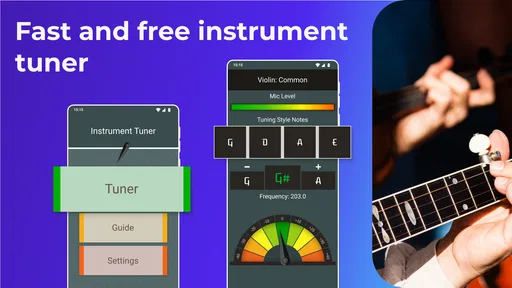
Instrument Tuner fits that moment well. The store presents it as a simple and accurate tuner built by musicians for musicians, and in use the important word is “simple.” I do not have to work through a complicated audio workspace before reaching the tuning function. The app is best understood as a focused utility that turns the phone into a reference during setup.
That focus also tells me what not to expect. This is not a replacement for a full practice companion, an instrument course, or a studio application. If I want guided scales, rhythm training, sheet music, effects, or a place to save recordings, I would look elsewhere. The value here comes from completing one job with as little distraction as possible.
The first pass: creating a clean signal
I get more reliable results when I begin in a reasonably quiet room and play one note at a time. That is not a special trick belonging only to this app; it is simply good tuner practice. Background music, nearby conversations, and several strings ringing together can make any phone-based tuner harder to read. I also let the note sound naturally instead of striking it repeatedly while the display is still reacting.
Worth Reading Before You Choose

EA SPORTS FC Mobile 26 Is a Bigger Football Game, but It Takes Time

Flipboard Shows What News Apps Must Do Beyond the Feed

Switching to Android Auto Means Rethinking Your Driving Routine

Google Calendar Makes a Crowded Week Easier to Manage

Ludo King Makes the Most of the Minutes Between Plans

Baby Panda World Brings Quick Play to Modern Phones, but Its Game Library Feels Busy
This is one of the first useful habits I would pass on to a new user: tune slowly enough to separate diagnosis from correction. Play the string, watch the response, make a small adjustment, and play it again. Turning the peg or key continuously while trying to interpret the screen makes it harder to know which change helped.
The phone’s position matters too. I keep it close enough to hear the instrument clearly, but not so close that handling the device interferes with the instrument. For an acoustic instrument, placing the phone on a stable surface can be more comfortable than holding it in the same hand used for tuning. The app is free, so this kind of setup costs nothing and makes the workflow feel less rushed.
Reading the response instead of guessing
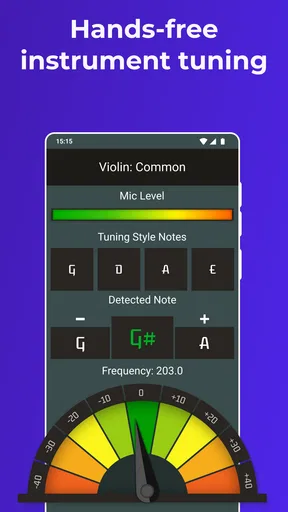
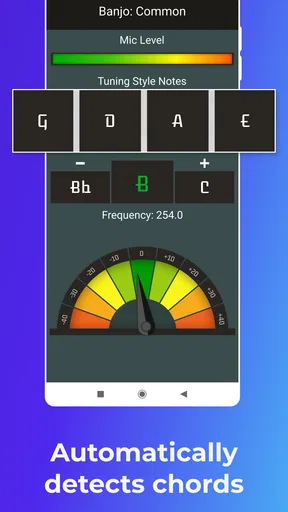
The central handoff is from sound to visual feedback. I play a note, the microphone picks it up, and the app gives me a display that I can use while adjusting the instrument. The practical lesson is to treat the display as a guide toward the center, not as a reason to chase every tiny movement. A plucked string naturally changes as it fades, so the reading can move even when the instrument is close.
I prefer to make a rough correction first and then a smaller correction. If the note is clearly low, I bring it upward in a controlled way, stop, and test again. If it is clearly high, I lower it carefully and repeat the check. This two-stage approach is safer and faster than trying to land perfectly in one turn, especially on strings that respond quickly.
Another detail that improves the handoff is muting neighboring strings. On a guitar-like instrument, sympathetic vibration can add extra sound to the microphone. I lightly mute strings I am not checking, then play only the target string. This is a concrete advantage of using the tuner as part of a repeatable routine rather than opening it only when something sounds dramatically wrong.
Moving through the whole instrument
Once the first string is close, I work through the remaining strings in an orderly direction. I do not jump randomly between them, because a consistent sequence makes it easier to notice whether the instrument is settling or whether an earlier adjustment has affected the overall setup. After reaching the final string, I return to the beginning and perform a second pass.
That second pass is important in real use. Changing tension on one string can slightly alter the balance of the instrument, particularly when the strings are older or the instrument has just been restrung. A tuner can show that each individual note is near its target, but the useful outcome is a stable set of strings after the complete sequence. I would not stop after the first apparently correct reading.
For a quick practice session, I usually do a short confirmation rather than spending several minutes pursuing microscopic changes. For recording or playing with other people, I take more care: quiet surroundings, one string at a time, two passes, and a final check after the instrument has had a moment to settle. The app supports that workflow because it is quick to reopen and does not try to turn tuning into a larger project.
Where the handoffs become practical
The app is only one part of the process. The first handoff is from the player’s ear to the phone’s microphone. The second is from the visual reading to the tuning hardware. The third is from the individual string check to the instrument as a whole. Most frustration comes from treating one of those handoffs as automatic.
For example, a convincing display does not fix a loose string, a slipping peg, or a mechanical problem. If I tune a string correctly and it drifts immediately, repeating the same adjustment in the app is not the right solution. I need to inspect the instrument, stretch or seat the string appropriately, and then use the tuner again. The app helps me identify the pitch; it cannot repair the part that is failing to hold it.
Likewise, a phone microphone is not the same as a dedicated clip-on tuner in every environment. In a quiet bedroom or rehearsal corner, the app is convenient. In a busy room with several musicians tuning simultaneously, a clip-on device may isolate the instrument more effectively. That is the trade-off I would keep in mind before relying on a phone alone for a loud stage or crowded rehearsal.
A realistic everyday scenario
Imagine I have ten minutes before an evening practice session. My instrument sounds acceptable but not quite settled after being carried outside. I place the phone where I can see it, open Instrument Tuner, mute the neighboring strings, and check each one separately. I correct the obvious deviations first, make a second pass, and then play a familiar chord or short phrase by ear.
If the chord still sounds uneven, I return to the string that seems responsible instead of restarting the entire process. That combination of visual help and final listening is more useful than trusting either method alone. The app gets me from uncertainty to a workable starting point quickly, while my ears confirm whether the result makes musical sense in context.
For a beginner, this workflow also teaches a valuable distinction: “the display is centered” and “the instrument feels ready” are related but not identical. The first is a pitch check. The second includes stability, balance, string condition, and the way notes sound together. Instrument Tuner handles the first part well; the player still owns the second.
What the app is like over repeated use
After using it as a routine tool, I appreciate that the experience stays focused on the immediate task. The app belongs to the Music & Audio category, but it does not feel like a general-purpose audio platform. That makes it easier to recommend to someone who wants a tuner without installing an app filled with unrelated content.
The audience response is strong: it holds a 4.4 average from around eighteen thousand ratings, with over one million installs and around three hundred ninety written reviews. I do not treat popularity as proof that every instrument or room will produce the same result, but it does suggest that the straightforward approach works for many ordinary users.
The free entry point is another reason it is easy to try. There are in-app purchases ranging from $0.99 to $99.99 per item, so I would pay attention to any purchase screen and decide whether the basic experience already meets my needs. For someone who only needs occasional tuning, the sensible approach is to begin with the free app and judge it by the clarity of its response and the speed of the workflow, rather than assuming that spending more is necessary.
Small habits that improve accuracy
Use one clear note at a time: let the sound develop, then adjust instead of striking repeatedly during the reading.
Mute what you are not testing: this reduces competing vibrations and makes the microphone’s job easier.
Make two passes: the first brings the instrument close, while the second catches movement caused by changing string tension.
Finish with your ears: check a chord, interval, or short phrase after the display suggests that the strings are ready.
These steps are more valuable than simply knowing that the app is “accurate.” They explain how to create conditions in which a phone tuner can give useful feedback. They also prevent a common mistake: blaming the app for an unstable instrument, noisy room, or rushed technique.
Where this workflow breaks down
The weakest part of the experience is the dependence on the surrounding conditions. A phone-based tuner needs a recognizable signal, and that signal can be compromised by background sound, multiple instruments, or an instrument that produces a weak or uneven note. In those situations, the display may take longer to settle or may be less comfortable to interpret than a dedicated tuner designed for isolation.
I would also be cautious about using it as the only reference for unusual tunings or instruments that require specialist handling unless I already understand the target pitches. A simple tuner can help with pitch, but it does not replace knowledge of the instrument’s tuning system. Beginners should learn which notes they are aiming for before turning keys based only on a moving indicator.
There is also a practical phone issue: if the device is needed for calls, music playback, or another rehearsal function, opening a separate tuner may feel less convenient than having a small dedicated unit clipped to the instrument. That is not a flaw in TarrySoft’s app so much as the natural cost of using a multipurpose device. The phone is easy to carry, but it is not always the most specialized tool.
Who should use it, and who should choose something else
I would recommend Instrument Tuner to beginners who want a clear first tuning tool, casual players who need a quick check before practice, and experienced musicians who prefer not to carry extra hardware for everyday sessions. It is especially suitable when the room is quiet and the goal is to get an acoustic instrument into a dependable starting range without opening a larger music suite.
I would choose a dedicated clip-on tuner instead for loud rehearsals, stage work, or situations where the phone must remain available for other tasks. I would also look for a more specialized solution if I needed advanced instrument-specific guidance, detailed tuning history, or a broader practice environment. The important point is that this app is not trying to win those categories; its usefulness comes from staying close to the basic tuning job.
My final assessment after the complete workflow
Instrument Tuner is a practical first step, not a complete musician’s toolbox. I like it because the path from an uncertain note to a usable instrument is short: create a clean sound, read the response, make a controlled adjustment, repeat across the strings, and confirm the result by ear. That is exactly the workflow I want when I am preparing to practice and do not want extra features in the way.
Its limitations are equally clear. The phone microphone depends on the room, the instrument, and the player’s technique. It cannot diagnose hardware problems, teach unfamiliar tuning systems, or isolate sound as reliably as every dedicated tuner. Still, for a free Android app from TarrySoft with an Everyone rating and a long presence in the category, it offers a sensible balance of accessibility and focused usefulness.
If your usual need is “I have an instrument in front of me and want to know whether it is in tune,” I think it is worth trying. Start quietly, tune one note at a time, repeat the pass, and listen to the finished instrument rather than stopping at the screen. Used that way, Instrument Tuner does not overpromise; it simply helps turn the first uncertain minutes of practice into a more confident beginning.
Pros
- Accurately tunes guitar
- bass
- ukulele
- and other common instruments.
- Clear note display makes tuning easy for beginners.
- Works quickly without requiring musical theory knowledge.
- Useful chromatic mode supports a wide range of instruments.
- Compact design makes it convenient for practice and performances.
Cons
- Microphone access is required for the app to detect instrument sounds.
- Background noise can affect tuning accuracy in busy environments.
- Some advanced features may be limited or unavailable for free users.
- Ads may interrupt the tuning experience on certain versions.
- Pitch detection can be less reliable with very quiet instruments.
FAQs for Instrument Tuner
What is Instrument Tuner and what instruments does it support?
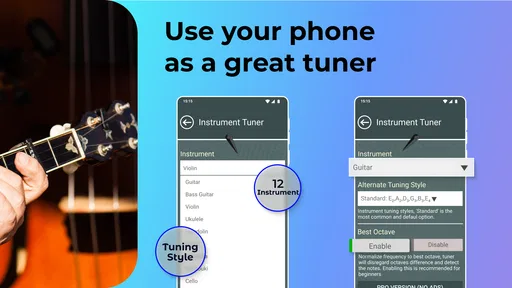
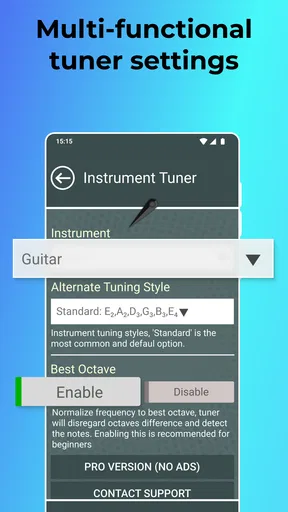
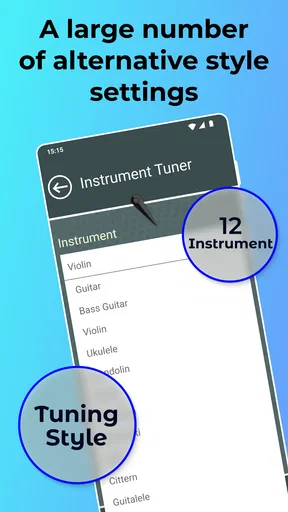
Instrument Tuner is a mobile tuning app designed to help musicians tune their instruments accurately using the phone’s microphone. It is generally suitable for guitar, bass, ukulele, violin, viola, cello, and many other stringed instruments. Depending on the selected mode, you can use standard tuning or adjust individual strings manually. The app is especially useful for practice sessions, rehearsals, lessons, and quick tuning before performing.
How accurate is Instrument Tuner compared with a physical tuner?
During testing, Instrument Tuner provided quick and dependable readings when the instrument was played clearly and the phone was positioned close to the sound source. Its accuracy can be comparable to a basic chromatic tuner, although results depend on microphone quality, background noise, and the instrument’s volume. For the best performance, tune in a quiet room, play one note at a time, and allow the reading to stabilize before making adjustments.
Does Instrument Tuner work without an internet connection?
Instrument Tuner is generally designed to perform its core tuning function through the device microphone, so an internet connection may not be necessary once the app is installed. This makes it convenient for classrooms, rehearsal rooms, outdoor practice, or travel. However, some versions may include advertisements, premium features, analytics, or additional content that require connectivity. It is worth checking the app’s current store listing for offline limitations.
Is Instrument Tuner suitable for beginners and experienced musicians?
Yes, Instrument Tuner can be useful for both beginners and experienced players. Beginners benefit from its visual pitch indicator, which clearly shows whether a note is too sharp, too flat, or correctly tuned. More advanced musicians can use it for quick checks between songs or during practice. It does not replace learning proper tuning technique, but its simple interface makes accurate tuning easier for most players.
Are there any limitations or important settings to check before downloading?
Before downloading Instrument Tuner, check whether your instrument and preferred tuning are supported, especially if you use alternate tunings, a seven-string guitar, a five-string bass, or less common instruments. Microphone permission is required, and tuning can become unreliable in noisy environments or when several instruments play simultaneously. Also review whether the app contains advertisements, in-app purchases, or subscription features that may affect the overall experience.


